
 Accessories
 Calculus with bits and bytes – Part I Leave a comment

Maths can be frustrating from time to time, especially if you have to do advanced calculations which require a certain precision. Naturally, using the “hidden” libraries like math.h which come with the Arduino IDE or with its integrated GNU C-compiler, you may get a nice result with 8 digit precision for y=e^(sin(2πt+t0)) even on an old weak-chested AVR 8bit MCU. But at which price? You’ll get a bloated hex file which will slow down every time it has to calculate a result using the aforementioned function. That’s because there is no numeric coprocessor, thus, everything has to be done in software. It’s the compiler’s job to decompose the function in a combination of simpler functions and calls to library functions, to store intermediate results and to execute the whole sometimes repeatedly until the desired precision is obtained. Today, we will look at a specific use case where there is just not enough time for all that, so that we’ll have to learn about simplified and quicker ways to obtain the desired result.
The example of circular touch control
Some readers might remember that we made a very simplified and rough approach to this in the past. But this time, we aim for excellence! Imagine a Gauge component whose needle follows your finger when touching it and takes the .val attribute from 0 to 359, accordingly. Yes, we’ll make this possible! We’ll look into everything which is mathematically required and we’ll discuss how to achieve this only in the Nextion programming language. Remember, it can only handle signed 32bit integers which means entire numbers from -2 147 483 648 to 2 147 483 647. But this isn’t a Nextion specific limit. Most of the popular 32bit microprocessors like for example the SAMD21 or the RP2040 are based on the ARM Cortex M0(+) core which has similar capabilities. So, many of the following tips and tricks can also be used when you write programs for these.
From rectangular to polar
No, I won’t take you to either the North or the South Pole… it’s about different views of the one and same point, for example touch coordinates. Normally, and especially in the Nextion ecosystem, coordinates are always rectangular. That means that there are two orthogonal axes, called x and y, and every point in the geometric plane can precisely be described by two numbers, the x and the y coordinate. Since the axes are orthogonal which means that they form a right angle, the coordinates are called rectangular.
When it comes to describe a point on a circle, it’s often more useful to describe the same point by its distance to the center of the circle, the radius r, and the angle θ which is formed by a “zero” direction (usually the same as the x axis) and the line between the center and our point. Naturally, since we are always laking about the same point, there are ways to convert rectangular into polar coordinates and vice versa:
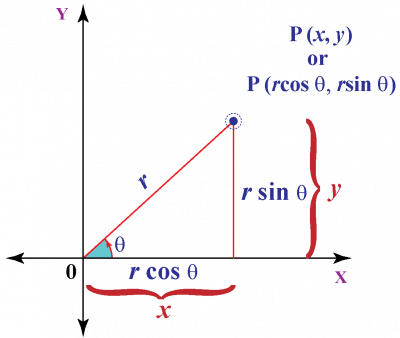
From our old Greek friend Pythagoras, we learn that r2 = x2 + y2 or accordingly, r = √(x2 + y2). Furthermore, by definition of the trigonometric functions, we know that cos(θ) = x/r, sin(θ) = y/r, and tan(θ) = y/x. Especially the latter is of interest for our project since we might probably find the angle θ from arbitrary x and y coordinates, without the need to calculate the radius r.
There remain some things to solve
Imagine we have the following coordinates: x = 40, y = 30. Per definition, tan(θ) = 30/40 = 0.75. Now, let’s move by 180° and we obtain x = -40, y = -30. Thus, tan(θ) = -30/-40 = 0.75. So, in both cases, when using a pocket calculator to find the corresponding angle, we get 36.87° although our points are on opposite halves of the circle! Because trigonometric functions are periodic (repeating patterns), multiple angles θ can have the same tan(θ) value. So, in practice, it’s a little more complicated and we have to look for other details like the signs of the x and y coordinates to make sure that we get the correct angle.
Another thing is that for angles close to 90° (and thus to 270°), x becomes incredibly small compared to y and tends toward zero. Thus, we risk to run into problems when dividing y by x. To get around this, we’ll use a folding mechanism. By definition, 1/(tan(θ)) = tan(90° – θ). Or, simplified for our case: tan(90° – θ) = x/y. That means that as long as the absolute value of y is smaller than the absolute of x, we are in the 0 to 45° range and we can use y/x to find our angle. in the other case, we use x/y and subtract the result from 90° to get the desired angle.
Third, we need some precision for the result of our divisions. Remember, the Nextion language allows only integer divisions. If we go back to our above example and let the Nextion compute y/x = 30/40, the result will be simply 0 which is horribly wrong. To work around this limitation, let’s multiply y by 100, beforehand. Then, we let the Nextion compute 100*x/y = 3000/40 = 75. Since we added 2 decimals by the previous multiplication by 100, we know that the result has now two decimals, too, and the displayed 75 is in reality 0.75. We’ll just have to remind this for later and to take this into account in a further stage of the calculations. Since the Nextion’s integrated CPU works not with decimal but with binary numbers, we’ll multiply the numerator of our fraction by 256 to get the needed precision. This doesn’t even require a multiplication, a simple 8bit-shift to the left will append eight binary zeros to our number.
Fourth, even with the question of precision solved, we run into some limitations of the Nextion programming language. As we saw above, we need to extract the sign and the absolute values of the x and y coordinates to determine the angle in the full 0 to 359° range, but there are neither abs(x) nor sgn(x) functions. So, we have to build them by ourselves. Fortunately, it will be sufficient to build the sign function which shall return 1 for positive input and -1 for negative input. Afterwards, we can multiply the initial number by the result of the sign function to obtain its absolute value. Since in a 32bit signed integer, the most significant bit (bit 31) represents the sign of its content, 1 when negative, and 0 when positive, an arithmetic right shift by 31 bits will not only move the original sign bit in the least significant position (bit 0) but having copies of it in all places. Take any positive or zero 32bit integer z and calculate z >> 31, the result will always be 0x00000000, and for any negative input, you’ll get 0xFFFFFFFF which is the hexadecimal representation of -1 with the same operation. We are almost there. Let’s now multiply this by two by doing a left shift by 1 bit and we get 0x00000000 and 0xFFFFFFFE, respectively. Finally, add 1 and we end up with 0x00000001 (1) and 0xFFFFFFFF (-1) which is exactly what we need.
Fifth, and almost last for today (I know, it’s heavy stuff, but we really need it), we need a function to find the corresponding angle for the result of our above division. Implementing a “true” arctan(x) function would be an overkill. As we saw above, with folding and mirroring and wrapping around we “only” need a function which gives us an angle between 0° and 45° for our quotient which, thanks to the upscaling by 8 for more precision, has values from 0 to 256 (I told you above we’d have to remind this!). We’ll then use a weird but precise enough approximation to get a correct result +/- 1° to make our gauge following the touch. Inside the function, some more bit shifting and scaling tricks are applied to get the required precision and to simplify the calculations in a way that a Cortex M0 processor might execute them quickly. In Nextion language and its linear parsing, it’s even a one liner:
angle.val=256-quotient.val*4009+2949120*quotient.val+8388608>>24
Phew… That took me a few days to optimize, but it works!
Sixth, just not to forget it, we’ll have to take into account what I call the Nextion’s trigonometric anomaly… As you can see in the graph above, mathematicians see 0° straightforward to the right and increasing angles make move the spot counterclockwise. But the Nextion gauge has its 0° position straightforward to the left and increasing the angle (the .val attribute) moves the needle clockwise. But since we are already on checking signs, flipping, folding and mirroring, it won’t make our code more complicated, we’ll happily adapt to that.
That’s all for today. Next week, we’ll go into practice with an ambitious demo project where we’ll try to pack all the code into a touch cap component, so that we may have multiple touch sensitive gauges on one page.
Last, but not least
You have any questions, comments, critics, or suggestions? Just send me an email to thierry (at) itead (dot) cc! 🙂
And, by the way, if you like and you find useful what I write, and you are about to order Nextion stuff with Itead, please do so by clicking THIS REFERRAL LINK! To you, it won’t forcibly make a change for your order but on some products, you may even get a 10% discount using the coupon code THIERRYFRSONOFF. In ever case, it will pay me perhaps the one or the other beer or coffee. And that will motivate me to write still more interesting blogs 😉
Thank you for reading and happy Nextioning!
